Backup and restore POS 2021
🕒 最後更新:2026-04-26 20:34***********CAUTION: Incorrect execution of these steps may result in the PERMANENT DELETION of all data within the POS system.*************
First, navigate to [This PC] and open Local Disk (C:)
Then, locate and open the folder named 'curl'.

Next, double-click the 'posbackup' file to execute the backup process.

Subsequently, a backup file will be generated.

The file will be named according to the following format: pos_hq_date-month-day-date-month_backup.bk
Right-click the file and select 'Rename'. Subsequently, copy the ENTIRE filename, including the '.bk' extension.

Once copied, right-click the 'posrestore' file and select 'Edit with Notepad++
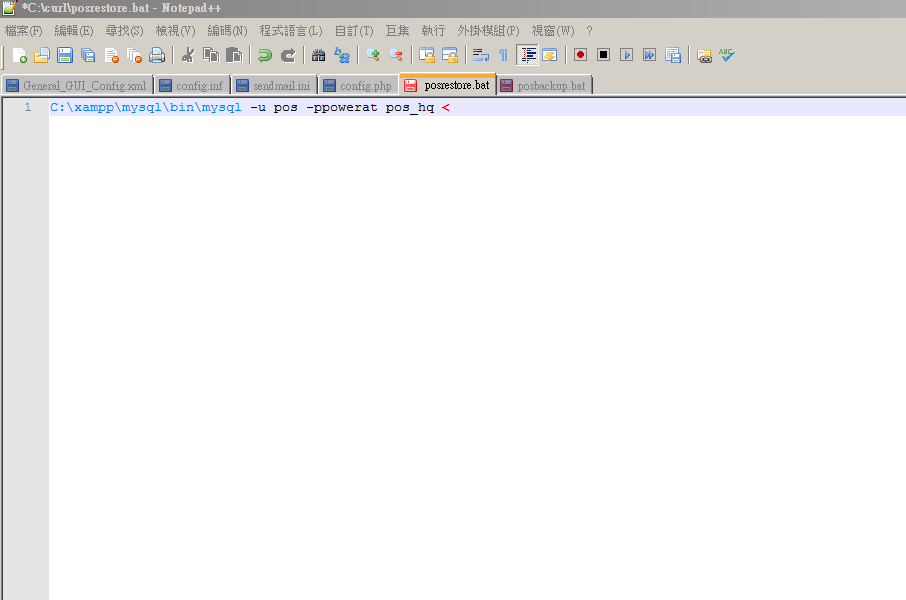
Paste the copied filename into the designated area.

Save the changes once the update is complete.
Subsequently, run 'posrestore' to restore the entire POS system.